-
스프링부트 게시판 (1)이커머스 devops 2025. 11. 25. 11:01
0. MySql docker 세팅
$ docker run --name springboot-board-mysql -e MYSQL_ROOT_PASSWORD=root -d -p 3306:3306 mysql:8.0.38
$ docker exec -it springboot-board-mysql bash
bash-5.1# mysql -u root -p
mysql> create database article;
mysql> use article
mysql> create table article (
-> article_id bigint not null primary key,
-> title varchar(100) not null,
-> content varchar(3000) not null,
-> board_id bigint not null,
-> writer_id bigint not null,
-> created_at datetime not null,
-> modified_at datetime not null -> );1. snowflake
- pk - snowflake 채택
- 분산 시스템에서 고유한 64비트 ID를 생성하는 알고리즘
- [1비트][41비트 : 타임스탬프][10비트: 노드ID][12비트: 시퀀스 번호]
- 분산 환경에서도 중복 없이 순차적 ID 생성하기 위한 규칙
- 유니크, 시간 기반 순차성, 분산 환경에서의 높은 성능
2. Data Initialize
@SpringBootTest
public class DataInitializer {
    @PersistenceContext
    EntityManager em;

    @Autowired
    TransactionTemplate transactionTemplate;

    Snowflake snowflake = new Snowflake();
    CountDownLatch latch = new CountDownLatch(EXECUTE_COUNT);

    static final int BULK_INSERT_SIZE = 2000;
    static final int EXECUTE_COUNT = 6000;

    @Test
    void initialize() throws InterruptedException {
        ExecutorService executorService = Executors.newFixedThreadPool(10);
        for (int i = 0; i < EXECUTE_COUNT; i++) {
            executorService.submit(() -> {
                insert();
                latch.countDown();
                System.out.println("latch.getCount() = " + latch.getCount());
            });
        }
        latch.await();
        executorService.shutdown();
    }

    void insert() {
        transactionTemplate.executeWithoutResult(status -> {
            for (int i = 0; i < BULK_INSERT_SIZE; i++) {
                Article article = Article.create(
                        snowflake.nextId(),
                        "title" + i,
                        "content" + i,
                        1L,
                        1L
                );
                em.persist(article);
            }
        });
    }
}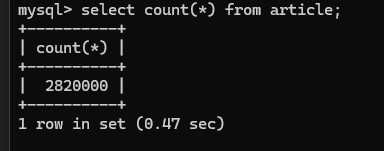
맥북에어에서도 그렇고 삼성노트북에서도 그렇고 30분 정도 걸리고 메모리 부족으로 중간에 끊긴다
아쉽지만,, 이대로 개발 진행
게시글 목록 조회
[ 페이징 처리 ]
- 서버 애플리케이션 내의 메모리로 디스크에 저장된 모든 데이터를 가져오고 특정 페이지만 추출하는 것은 비효율적
- 디스크 접근은 메모리 접근보다 느림 (디스크 I/O 비용)
- 디스크에 저장된 데이터는 메모리 용량을 초과할 수 있다 (OOM)
- 데이터베이스에서 특정 페이지의 데이터만 바로 추출하는 페이징 쿼리 사용
- 페이지 번호
- 무한 스크롤
[ 1. 페이지 번호 ]
- N번 페이지에서 M개의 게시글
- ex. 페이지당 30개의 게시글을 보여주고 총 94개의 글이 있다면 사용자는 4번 페이지까지 이동할 수 있다
- SQL offset, limit 활용해 페이지 쿼리 (offset 지점부터 limit개의 데이터 조회)
1.1
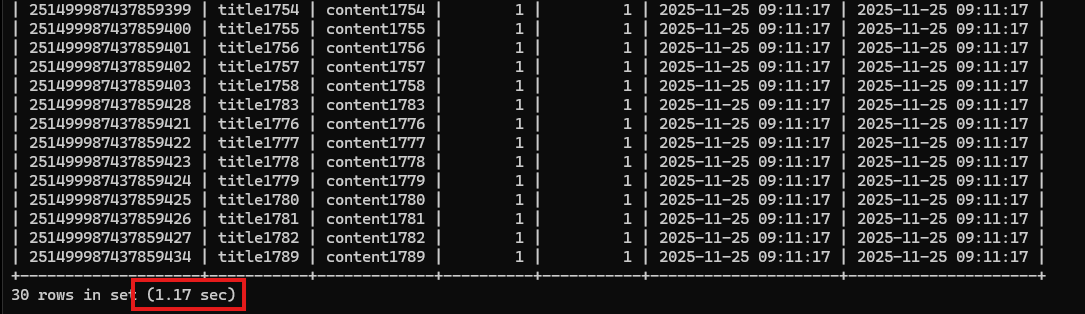
select * from article where board_id = 1 order by created_at desc limit 30 offset 90;
280만건 데이터 기준으로 1.17초가 걸렸다

explain select * from article where board_id = 1 order by created_at desc limit 30 offset 90;
- type = ALL : 풀스캔
- Extras = Using where; Using filesort : where절로 조건에 대해 필터링, 데이터가 많기 때문에 정렬을 수행할 수 없어 디스크에서 데이터를 정렬하는 filesort 수행
- 전체 데이터에 대해 필터링 및 정렬하기 때문에 큰 비용 소모
1.2 인덱스
- 데이터를 빠르게 찾기 위한 방법
- 인덱스 관리를 위해 부가적인 쓰기 작업과 공간 필요
- 다양한 데이터 특성과 쿼리를 지원하는 자료구조
- B+ tree, Hash, LSM tree, R tree, Bitmap
- Relational Database에서는 주로 B+ tree
- 데이터가 정렬된 상태로 저장된다
- 검색, 삽입, 삭제 연산을 로그 시간(O(log n))에 수행 가능
- 트리 구조에서 leaf node 간 연결되기 때문에 검색 효율적
- 인덱스를 추가하면 쓰기 시점에서 B+ tree 구조의 정렬된 상태의 데이터 생성
- 이미 인덱스로 지정된 컬럼에 대해 정렬된 상태를 가지고 있기 때문에 조회 시점에 전체 데이터를 정렬하고 필터링할 필요없이 빠르게 수행 가능
- MySQL의 기본 스토리지 엔진 : InnoDB
- 스토리지 엔진 : DB에서 데이터 저장 및 관리 장치
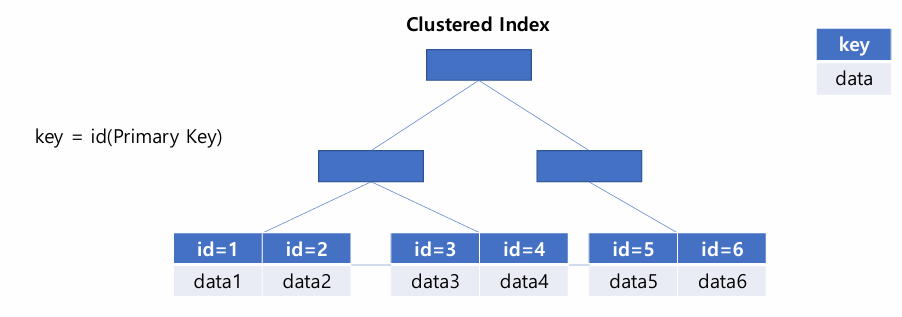
- InnoDB는 테이블마다 Clustered Index를 자동 생성
- PK 기준으로 정렬되니 Clustered Index
- Clustered Index는 leaf node의 값으로 행 데이터를 갖는다
- article_id를 기준으로 하는 Clustered Index가 생성
- PK를 이용한 조회는 자동으로 생성된 Clustered Index로 수행
create index idx_board_id_article_id on article(board_id asc, article_id desc);

- board_id 오름차순 정렬
- article_id 내림차순 정렬
- 인덱스는 순서가 중요하다
- 게시판별로 생성 시간 순으로 정렬된 상태의 데이터 생성
- 게시글이 동시에 생성될 수 있기 때문에 article_id( Snowflake ) 사용
- 페이지당 1개의 게시글을 나타낼 때, 2번 게시판에서 2페이지를 조회하려면 board_id = 2, offset = 1, limit = 1
- 조회 시점에 데이터 정렬하고 모든 데이터에 대해 직접 필터링하는 과정 생략

select * from article where board_id = 1 order by article_id desc limit 30 offset 90;
1.17초에서 0.01초로 더 빠르게 조회되었다

- key = idx_board_id_article_id : 생성한 인덱스가 쿼리에 사용되었다
- Secondary Index(보조 인덱스, Non-clustered Index )
- Secondary Index의 leaf node는 인덱스 컬럼 데이터, 데이터에 접근하기 위한 포인터를 가지고 있다
- 데이터는 Clustered Index가 가지고 있다
Clustered Index Secondary Index 생성 테이블의 Primary Key로 자동 생성 테이블의 컬럼으로 직접 생성 데이터 행 데이터(row data) 데이터에 접근하기 위한 포인터 인덱스 컬럼 데이터 개수 테이블 당 1개 테이블 당 여러 개 select * from article where board_id = 1 order by article_id desc limit 30 offset 1499970;

- 뒷 페이지로 갈수록 다시 느려진다
- Secondary Index를 이용한 데이터 조회는 인덱스 트리를 두 번 탄다
- Secondary Index에서 데이터에 접근하기 위한 포인터를 찾는다
- 포인터를 이용해 Clustered Index에서 데이터를 찾는다
- 1. (board_id, article_id)에 생성된 Secondary Index에서 article_id를 찾는다
- 2. Clustered Index에서 article 데이터를 찾는다
- 3. offset 1499970을 만날 때까지 반복하며 skip 한다
- 4. limit 30개를 추출한다
1.3 커버링 인덱스
select board_id, article_id from article where board_id = 1 order by article_id desc limit 30 offset 1499970;
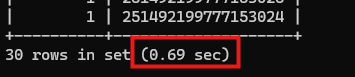
- board_id와 article_id만 추출하는 것은 0.2초가 소요되었다

- 인덱스는 동일하게 사용되었고 Extra=Using index 가 추가되었다
- Covering index
- 인덱스의 데이터만으로 조회를 수행할 수 있는 인덱스
- 데이터(Clustered Index)를 읽지 않고 인덱스(Secondary Index) 포함된 정보만으로 쿼리 가능한 인덱스
select * from (
select article_id from article
where board_id = 1
order by article_id desc
limit 30 offset 1499970
) t left join article on t.article_id = article.article_id;
- 추출된 30건의 article_id에 대해서만 clustered index에 접근하도록 쿼리 수정
- 8.09sec > 0.26sec로 빠르게 수행되었다

- DERIVED : article_id 추출을 위한 sub query 과정에 파생 테이블
- 작은 규모의 파생 테이블과 join해 30건에 대해서만 Clustered Index에서 데이터를 가져오기 때문에 빠르게 처리될 수 있다
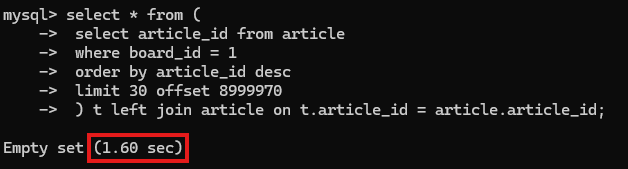
- 뒷 페이지로 갈수록 속도가 느려지는 문제는 여전하다
- article_id 추출을 위해 Secondary index만 탄다고 하더라도 offset 만큼 index scan이 필요하다
- 데이터 접근하지 않더라도 offset이 늘어날수록 느려질 수밖에 없다
- 해결 방법
- 데이터를 한 번 더 분리한다 (ex. 1년 단위로 분리)
- offset 인덱스 페이지 단위 skip 하는 것이 아니라 1년 동안 작성된 게시글 수 단위로 즉시 skip 한다
- 애플리케이션에서 처리 코드 작성 필요
페이지 번호
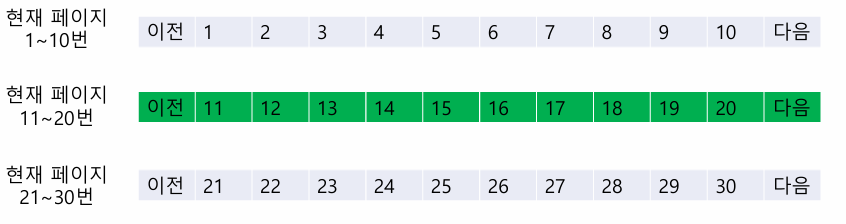
- 사용자가 11~20번 페이지에 있을 때에는, 601개의 게시글 유무만 알면 된다
- 601개면 다음 버튼까지 활성화
- 601개 미만이면 개수만큼 페이지 버튼 활성화
- (((n – 1) / k) + 1) * m * k + 1
- 현재 페이지(n)
- 페이지당 게시글 개수(m)
- 이동 가능한 페이지 개수(k)
- ((n - 1) / k)의 나머지는 버림
- n=7, m=30, k=10 > (((7 - 1) / 10) + 1) * 30 * 10 + 1 = 301
@Repository
public interface ArticleRepository extends JpaRepository<Article, Long> {
    @Query(
            value = "select article.article_id, article.title, article.content, article.board_id, article.writer_id, " +
                    "article.created_at, article.modified_at " +
                    "from (" +
                    "   select article_id from article " +
                    "   where board_id = :boardId " +
                    "   order by article_id desc " +
                    "   limit :limit offset :offset " +
                    ") t left join article on t.article_id = article.article_id",
            nativeQuery = true
    )
    List<Article> findAll(
            @Param("boardId") Long boardId,
            @Param("offset") Long offset,
            @Param("limit") Long limit
    );

    @Query(
            value = "" +
                    "select count(*) from (" +
                    "   select article_id from article where board_id = :boardId limit :limit" +
                    ") t",
            nativeQuery = true
    )
    Long count(@Param("boardId") Long boardId, @Param("limit") Long limit);
}
@Service @RequiredArgsConstructor public class ArticleService { private final Snowflake snowflake = new Snowflake(); private final ArticleRepository articleRepository; ... public ArticlePageResponse readAll(Long boardId, Long page, Long pageSize) { return ArticlePageResponse.of( articleRepository.findAll(boardId, (page-1) * pageSize, pageSize).stream() .map(ArticleResponse::from) .toList(), articleRepository.count( boardId, PageLimitCalculator.calculatePageLimit(page, pageSize, 10L) ) ); } }public class ArticleApiTest { RestClient restClient = RestClient.create("http://localhost:9000"); ... @Test void readAllTest() { ArticlePageResponse response = restClient.get() .uri("/v1/articles?boardId=1&pageSize=30&page=1") .retrieve() .body(ArticlePageResponse.class); System.out.println("response.getArticleCount(): " + response.getArticleCount()); for (ArticleResponse article : response.getArticles()) { System.out.println("article: " + article); } } }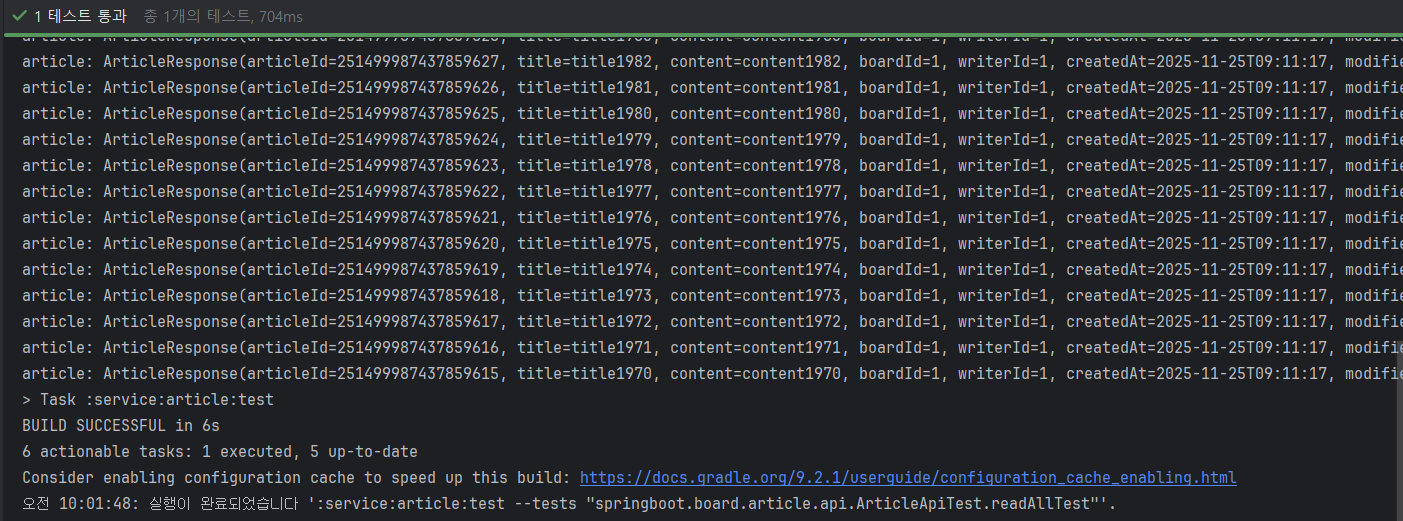
무한 스크롤
- 무한 스크롤에서는 마지막으로 불러온 데이터를 기준점으로 활용할 수 있다
- 데이터베이스에서는 기준점으로 쿼리를 수행한다
- 이때, 기준점에 생성된 인덱스를 통해 로그 시간에 접근할 수 있다
- offset만큼 scan 하는 과정이 필요하지 않으며 limit 개수를 즉시 추출할 수 있다
- 따라서 뒷 페이지를 가더라도 균등한 속도를 보장할 수 있다
- 1번 페이지
select * from article where board_id = {board_id} order by article_id desc limit 30;
- 2번 페이지 이상(기준점 = {last_article_id})
select * from article where board_id = {board_id} and article_id < {last_article_id} order by article_id desc limit 30;- 기준점을 인덱스에서 로그 시간에 즉시 찾을 수 있으므로, 아무리 뒷 페이지를 가더라도 균등한 조회 속도가 보장된다
@Repository
public interface ArticleRepository extends JpaRepository<Article, Long> {
    ...
    @Query(
            value = "select article.article_id, article.title, article.content, article.board_id, article.writer_id, " +
                    "article.created_at, article.modified_at " +
                    "from article " +
            "where board_id = :boardId " +
            "order by article_id desc limit :limit",
            nativeQuery = true
    )
    List<Article> findAllInfiniteScroll(@Param("boardId") Long boardId, @Param("limit") Long limit);

    @Query(
            value = "select article.article_id, article.title, article.content, article.board_id, article.writer_id, " +
                    "article.created_at, article.modified_at " +
                    "from article " +
                    "where board_id = :boardId and article_id < :lastArticleId " +
                    "order by article_id desc limit :limit",
            nativeQuery = true
    )
    List<Article> findAllInfiniteScroll(@Param("boardId") Long boardId, @Param("limit") Long limit, @Param("lastArticleId") Long lastArticleId);
}
@Slf4j @SpringBootTest class ArticleRepositoryTest { @Autowired ArticleRepository articleRepository; ... @Test void findInfiniteScrollTest() { List<Article> articles = articleRepository.findAllInfiniteScroll(1L, 30L); for (Article article : articles) { log.info("article: {}", article); } Long articleId = articles.getLast().getArticleId(); List<Article> articles1 = articleRepository.findAllInfiniteScroll(1L, 30L, articleId); for (Article article : articles1) { log.info("article: {}", article); } } }pk 생성 전략
장점 단점 DB auto_increment • 간단하기 때문에 다음 상황에서 유리할 수 있다
- 보안적인 문제를 크게 고려하지 않는 상황
- 단일 DB를 사용하거나 애플리케이션에서 PK의 중복을 직접 구분하는 상황• 분산 데이터베이스 환경에서 PK가 중복될 수 있기 때문에, 식별자의 유일성이 보장되지 않는다
• 클라이언트 측에 노출하면 보안 문제유니크 문자열 또는 숫자 • 정렬 데이터가 아니라 랜덤 데이터를 삽입하는 것으로 키 생성 방식이 간단하다 • 랜덤 데이터로 인해 성능 저하가 발생할 수 있다
- 데이터 삽입 필요한 인덱스 페이지가 가득 찼다면, B+ tree 재구성 및 페이지 분할로 디스크 I/O 증가
- PK를 이용한 범위 조회가 필요하다면, 디스크에서 랜덤 I/O가 발생하 기 때문에, 순차 I/O보다 성능 저하유니크 정렬 문자열 • 분산 환경에 대한 PK 중복 문제 해결
• 보안 문제 해결
• 랜덤 데이터에 의한 성능 문제 해결• 데이터 크기에 따라, 공간 및 성능 효율이 달라진다
• PK가 크면 클수록 데이터는 더 많은 공간을 차지, 비교 연산에 의한 정렬/조회에 더 많은 비용 소모유니크 정렬 숫자 • 분산 환경에 대한 PK 중복 문제 해결
• 보안 문제 해결
• 랜덤 데이터에 의한 성능 문제 해결
• Snowflake, TSID 등의 알고리즘- 728x90'이커머스 devops' 카테고리의 다른 글
스프링부트 게시판 (3) (0) 2025.11.28 스프링부트 게시판 (2) (0) 2025.11.27 Distributed Relational Database (0) 2025.11.25 OSIV와 성능 최적화 (0) 2025.11.21 컬렉션 조회 최적화 (0) 2025.11.21